How search engines and AI assistants find your pages

Andy Bright
Director of Product and Technology
On this page
- The example: a coffee subscription page
- Step 1: A crawler discovers the page
- Step 2: The crawler fetches the page
- Step 3: The page is rendered
- Step 4: The search engine indexes the page
- Step 5: The page is ranked or retrieved
- Step 6: The page is shown
- Where AI assistants get their information
- What changes for AI search
- How the rest of this guide fits together
- What you can leave for later
- Try it on your own site
- Further reading
When someone searches Google or asks ChatGPT a question, the answer is put together in a second or two. The work that decides whether your website is part of that answer happens much earlier, in a series of steps that run behind the scenes. If one of those steps fails, your page can't appear, however good it is.
This chapter follows one web page through those steps, from the day it's published to the day it shows up in a search result or an AI answer. Along the way it explains the terms the rest of this guide uses. You don't need any technical background to follow it. If you meet a term later in the guide and want a reminder, the glossary explains it.
The example: a coffee subscription page
Fernhill Coffee is a small online coffee roaster. It's an invented business, but its problems are typical. Fernhill has just added a page about its new coffee subscription. In this guide we'll give Fernhill's website the address www.example.com, so the new page lives at https://www.example.com/subscriptions.
That address is the page's URL (Uniform Resource Locator). Every page on the web has one. Search engines treat each URL as a separate page, even when two URLs show exactly the same content.
The owner wants two things. When someone in the UK searches for "coffee subscription", the page should appear in Google. And when someone asks ChatGPT or Google's AI Mode "what's a good coffee subscription in the UK?", the answer should mention Fernhill and link to the page.
The diagram below shows the steps that have to happen first.
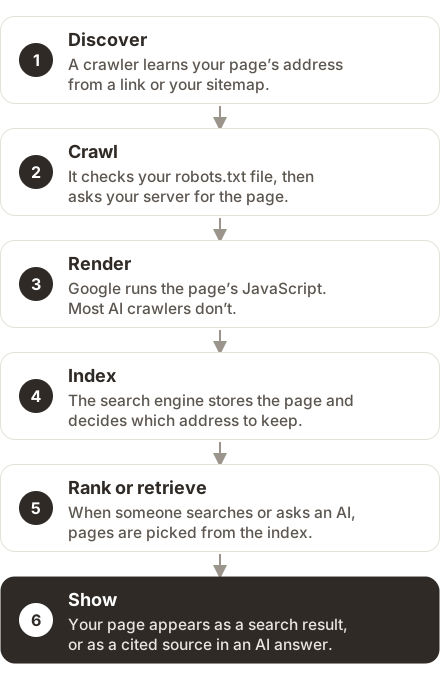
Google describes its own search the same way, in three stages(opens in a new tab): crawling, indexing and serving results. It also points out that not every page makes it through every stage. The diagram above splits those stages into six steps, because each one can fail for its own reasons.
Step 1: A crawler discovers the page
A crawler is a program that visits web pages automatically and downloads them. Search engines and AI companies each run their own. Google's is called Googlebot. People also call crawlers bots, robots or spiders, and Google's own guide(opens in a new tab) uses all four words for the same thing.
A crawler can't fetch a page until it knows the page's URL. It learns new URLs in two main ways.
The first is by following links. When Googlebot revisits Fernhill's home page and finds a new link to /subscriptions, it adds that URL to its list of pages to fetch. This is why a page that nothing links to, called an orphan page, is easy for crawlers to miss.
The second is a sitemap. An XML sitemap is a file on your site that lists the URLs you want search engines to know about, usually with the date each page last changed. Most website platforms create one for you, often at an address like https://www.example.com/sitemap.xml. The sitemaps chapter explains how to check yours.
Step 2: The crawler fetches the page
Before Googlebot fetches the subscription page, it checks a file called robots.txt. This is a short text file at the root of every website, at https://www.example.com/robots.txt. It tells crawlers which parts of the site they may visit. A crawler that follows the rules reads it first and skips any address the file tells it to avoid.
If robots.txt allows it, the crawler sends a request to Fernhill's server, the computer that stores the website and sends out its pages. The server replies with two things: a short code that says how the request went, and, if all is well, the page itself.
That short code is the HTTP status code. You rarely see it as a visitor, but crawlers read it on every request. A few codes come up again and again in this guide:
| Code | What it means | What a search engine does |
|---|---|---|
| 200 | OK, here's the page | Considers the page for its index |
| 301 | The page has moved permanently to a new address | Follows the redirect and treats the new address as the real one |
| 404 | There's no page at this address | Leaves the page out of results, and eventually drops it if it was there before |
| 500 | The server had an error | Slows down and tries again later. Repeated errors can drop the page |
Google's crawling documentation(opens in a new tab) lists how it handles every code. The redirects chapter covers the 301 and its relatives in detail.
There's often something else between the crawler and your server. Many sites sit behind a CDN (content delivery network), a service such as Cloudflare that stores copies of your pages on servers around the world so they load faster. CDNs often include security settings that block traffic they think is harmful. Those settings can turn away a crawler even when your robots.txt welcomes it. Since July 2025, Cloudflare has asked the owner of every new domain whether to block AI crawlers(opens in a new tab), so many sites now block them without anyone remembering the decision. The crawlability chapter shows how to check.
Step 3: The page is rendered
What the server sends back is HTML, the code that holds a page's text, headings, links and images. Many modern sites also use JavaScript, a programming language that runs in the visitor's browser and can add or change content after the page arrives.
On Fernhill's site, the subscription prices come from JavaScript. The server sends the page with an empty price table, and a script fills in the prices a moment later. In your browser you never notice the difference.
Rendering means running a page's JavaScript to build the finished page, the way a browser does. Google does this. Its Web Rendering Service runs pages in a version of the Chrome browser, according to Google's JavaScript guide(opens in a new tab), so Google eventually sees Fernhill's prices.
Most AI crawlers don't render. The best public study, by Vercel and MERJ in December 2024(opens in a new tab), found that none of the major AI crawlers it examined ran JavaScript. That included the crawlers from OpenAI, Anthropic and Perplexity. They read only the HTML the server sends. To them, Fernhill's price table is empty.
You can see what these crawlers see by looking at a page's source code, which is the HTML before any JavaScript runs. In most browsers you can right-click the page and choose "View page source". The JavaScript chapter explains how to check this properly and what to ask your developer to change.
Step 4: The search engine indexes the page
Next, the search engine decides whether to keep the page. Its index is the huge database of pages it has stored and can show in results. Google compares it to the index at the back of a book(opens in a new tab), with an entry for every word on every page it has seen. The comparison only goes so far, because Google's index also records things like the language a page is in, where its readers are, and how it relates to other pages.
Being crawled doesn't guarantee being indexed. A search engine can fetch a page and still decide not to store it. It might find the page too similar to another one, or be told not to keep it.
You can tell search engines not to keep a page with a noindex instruction. This is a short line in the page's HTML that says "don't put this page in your index". It's useful for pages such as order confirmations or internal search results. It causes problems when it's left on a page by mistake, for example when a redesigned site is copied from a test version to the live one.
Search engines also deal with duplicate content, which is the same page reachable at more than one URL. Fernhill's subscription page might also load at https://example.com/subscriptions (without www) and at https://www.example.com/subscriptions?utm_source=newsletter (with a tracking code from an email). To a crawler, those are three different addresses with the same content.
The search engine picks one of them to store and show. That chosen URL is called the canonical URL. You can tell search engines which one you prefer with a canonical tag in the page's HTML. The indexing chapter explains how to make sure they pick the right one.
Step 5: The page is ranked or retrieved
When someone searches for "coffee subscription UK", Google looks through its index for pages that match and puts them in order. That ordering is called ranking. It depends on many things, including how well the page answers the search and how other sites link to it. Technical SEO can't make a page rank on its own. Its job is to make sure the page can be considered at all.
AI assistants work in a similar way when they look things up. This process is called retrieval. It goes like this:
- Someone asks a question.
- The assistant runs one or more searches against a search index.
- It reads the pages it gets back.
- It writes an answer based on what it read.
Google calls this "grounding", and describes it in its guide to optimising for generative AI(opens in a new tab). The same guide explains query fan-out. An AI system often breaks one question into several related searches. For example, it might search for "best coffee subscriptions UK", "coffee subscription prices" and "ethical coffee roasters", and use the results of all three. That means a page can be used in an answer even if it doesn't match the person's exact words.
Step 6: The page is shown
If everything has worked, Fernhill's page appears in one of two forms.
In ordinary search results, it shows up as a blue link with a short description underneath. That description is called a snippet. Some results have extra features, such as star ratings, prices or event dates. These are called rich results, and they come from code on the page called structured data. The structured data chapter explains which ones still exist.
In an AI answer, the page can appear as a citation. This is a link to the page, shown as one of the sources the answer used. Google's AI Overviews and AI Mode use pages from Google's normal index. A page has to be "indexed and eligible to be shown in Google Search with a snippet" before it can be cited there, according to Google's page on AI features(opens in a new tab).
An AI answer can also mention Fernhill by name without linking to its page, or link to the page without recommending Fernhill. These are different outcomes, and it's useful to measure them separately. The AI search chapter explains how.
Where AI assistants get their information
AI assistants know about the web in two different ways.
The first is training. An AI model learns from a huge collection of text gathered before the model was built. Companies collect that text with training crawlers, such as OpenAI's GPTBot. What a model learned in training is fixed until the next version of the model, and answers based on it don't link to any source. If Fernhill's subscription page was published after the text was collected, the model has never seen it.
The second is search, the retrieval process from step 5. When an assistant looks something up, it can find pages published yesterday and link to them. Each AI company gets its search results differently:
- Google's AI Overviews and AI Mode use Google's own index.
- Microsoft Copilot uses Bing's index, as described in Bing's Webmaster Guidelines(opens in a new tab).
- ChatGPT, Claude and Perplexity each run their own search crawlers, such as OpenAI's OAI-SearchBot.
There's a third kind of visit, too. When someone pastes a link into ChatGPT and asks it to summarise the page, the assistant fetches that page on the spot. These visits are called user-triggered fetches, and they come from yet another set of crawlers.
So the AI companies send at least three kinds of crawler to your site, each with a different name and a different job. Your robots.txt can treat each one differently. You can let the search crawlers in and keep the training crawlers out, or the other way round. The crawlability chapter lists them all and explains how to decide.
What changes for AI search
Most of what helps Google also helps AI assistants, because AI search is built on the same steps. Google's own guide calls optimising for its AI features "still SEO"(opens in a new tab).
Three things are different:
- There are more crawlers. Each AI company runs its own, and each has to be allowed in by your robots.txt and by your CDN. A site that works perfectly for Google can still block ChatGPT's search crawler without anyone noticing.
- Most AI crawlers don't run JavaScript. They read only the HTML your server sends, so content added by JavaScript can be invisible to them, as with Fernhill's prices.
- There's more than one index. Your page needs to be in Google's index for Google's AI features, and in Bing's index for Copilot. ChatGPT, Claude and Perplexity crawl for themselves.
How the rest of this guide fits together
Each chapter of the guide covers one or more of the six steps.
| Step | What can go wrong | Chapter |
|---|---|---|
| 1. Discover | No links point to the page, or the sitemap leaves it out | Site architecture, Sitemaps and IndexNow |
| 2. Crawl | robots.txt or a CDN blocks the crawler, or the server returns an error | Crawlability and AI crawlers, Redirects and migrations |
| 3. Render | Important content only appears after JavaScript runs | JavaScript rendering |
| 4. Index | A noindex left on by mistake, or the wrong URL chosen as canonical | Indexing and canonicals, International SEO |
| 5. Rank or retrieve | Slow or unstable pages, or content that doesn't match what people ask | Page experience |
| 6. Show | No structured data for rich results, or no way to tell if you're being cited | Structured data, AI search |
The audit checklist puts every check from every chapter in one list.
What you can leave for later
Not everything in technical SEO is urgent. If your site has a few hundred pages, you can safely skip these at first:
- Crawl budget, which is how many pages a search engine is willing to crawl on your site. Google says its crawl budget advice(opens in a new tab) is for sites with roughly a million pages or more, or 10,000 or more pages that change every day.
- llms.txt, a proposed file for AI tools that Google Search says it ignores. The AI search chapter explains when it might be useful.
- Perfect speed scores. Google says that chasing a perfect score "just for SEO reasons may not be the best use of your time" (page experience guide(opens in a new tab)).
If your site is built on a common platform such as WordPress, Shopify, Squarespace or Wix, the platform already handles much of steps 1 to 4. Your job is mostly to check that nothing has been switched off or blocked. If you find a problem you can't fix through your platform's settings, that's the point to involve a developer.
Try it on your own site
These checks take about ten minutes and need nothing but a browser.
- Open
https://followed by your domain and/robots.txt. Check that it doesn't containDisallow: /underUser-agent: *. That line blocks every crawler from your whole site. - Open your sitemap, usually at
/sitemap.xml, and check that your important pages are listed. - Open an important page, right-click and choose "View page source". Search the source (Ctrl+F, or Cmd+F on a Mac) for a sentence you can see on the page, such as a price. If it isn't there, AI crawlers probably can't see it either.
- Set up Google Search Console(opens in a new tab) and Bing Webmaster Tools(opens in a new tab) if you haven't already. Both are free, and they show which of your pages are indexed and why others aren't.
Further reading
- In-depth guide to how Google Search works(opens in a new tab), Google's own description of crawling, indexing and serving results.
- AI features and your website(opens in a new tab), Google's short page on how AI Overviews and AI Mode choose pages.
- The rise of the AI crawler(opens in a new tab), the Vercel and MERJ study of how AI crawlers behave, including which ones run JavaScript.