
Check what AI answers say about your brand
Reputation is new on Business and above. Cleotic reads every captured answer that names your brand and picks out the statements it makes about you. It checks each one against the facts you've confirmed. A statement can match your facts, contradict them, mix you up with another company, or be out of date. Open Reputation in the brand sidebar.
When answers repeat a claim, such as a wrong support number or an old price, Cleotic groups the repeats into a narrative. The Narratives tab lists each one with its severity, and shows how many of each engine's latest answers display it. What to protect lists the positive claims engines repeat about you.
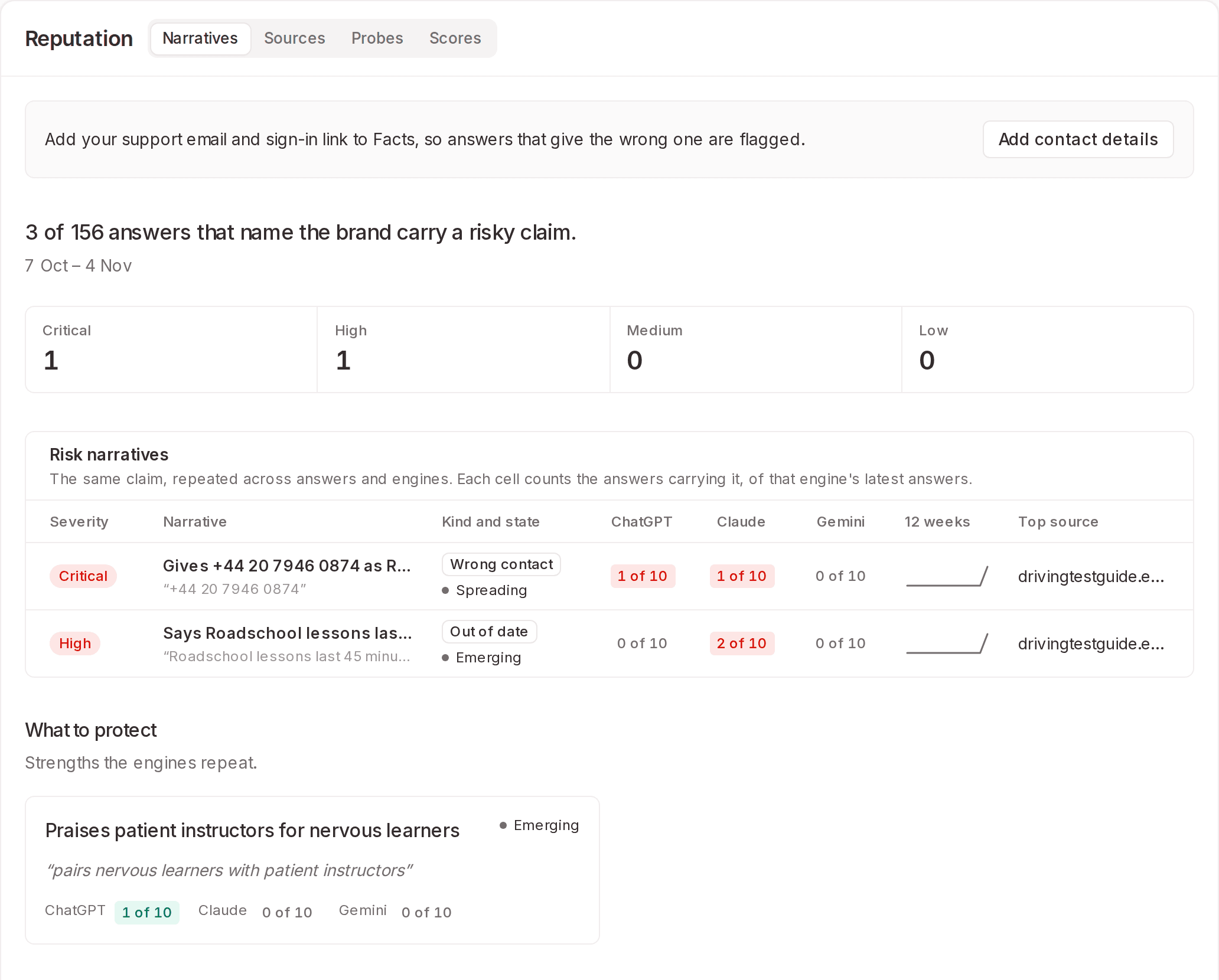
Phone numbers and email addresses get a stricter check that uses fixed rules instead of a model. Add yours in Brand settings › Facts › Contact details. Cleotic raises a critical alert in two cases:
An answer gives a phone number as yours that isn't one you've confirmed for that country.
An answer gives a free email address, such as a Gmail address, as yours.
The other tabs are:
Sources: Cleotic opens the pages an answer cites and checks whether they say what the answer claims.
Probes: Questions Cleotic asks every week to look for risky claims, about subjects such as trust and support. Choose from four packs or write your own. Business includes 24 probes per brand, and probe answers don't count towards your prompts or your visibility.
Scores: The old perception scores, now for your brand only. Reputation replaces Perception.
When a claim is wrong, Start a correction adds it to Opportunities. From there you can write a fix page in Content Studio, log the correction requests you send, and check whether the fix landed. Cleotic doesn't send correction requests for you.
Alert emails go out when a risky claim starts repeating. Choose Critical only, Critical and high or Off in Brand settings › Reputation. To send alerts to your own systems, add a signed webhook in Brand settings › Webhooks.
Each narrative also has an Evidence pack, which you can download as JSON or print as a PDF. It holds your confirmed facts and their sources, what Cleotic found on the cited pages, the captured answers with their times, and your correction log.
Write pages with Cleotic in Content Studio
Content Studio now writes pages together with you. It's on Business and above, and Business includes 15 pages a month.
Cleotic writes from facts you've confirmed. In Brand settings › Facts, Read now reads your own site and proposes facts, such as prices and services, for you to confirm under To review. You can add facts yourself too.
To start a page, choose New page. You can start from a question, paste a draft, or import a page from your site. You can also choose Write this on any question AI answers without you. These questions appear on the Content Studio home and in Opportunities.
Cleotic's content agent works in its own column beside the page. It writes a brief and proposes an outline, and it waits for your reply before it writes the first draft. Each step it takes appears as it happens. Open a step to see the pages, facts and AI answers it used.
You edit the page as you would a shared document. Type anywhere, use the formatting toolbar or Markdown shortcuts, and your changes save as you go. Cleotic proposes later edits as suggestions in the text, with deletions struck through and additions highlighted. You accept or reject each one in the margin. Switch Cleotic's edits to Apply if you'd rather it changed the page directly. Its fact-check notes appear in the margin too, where you can save a claim as a fact or ask Cleotic to soften it.
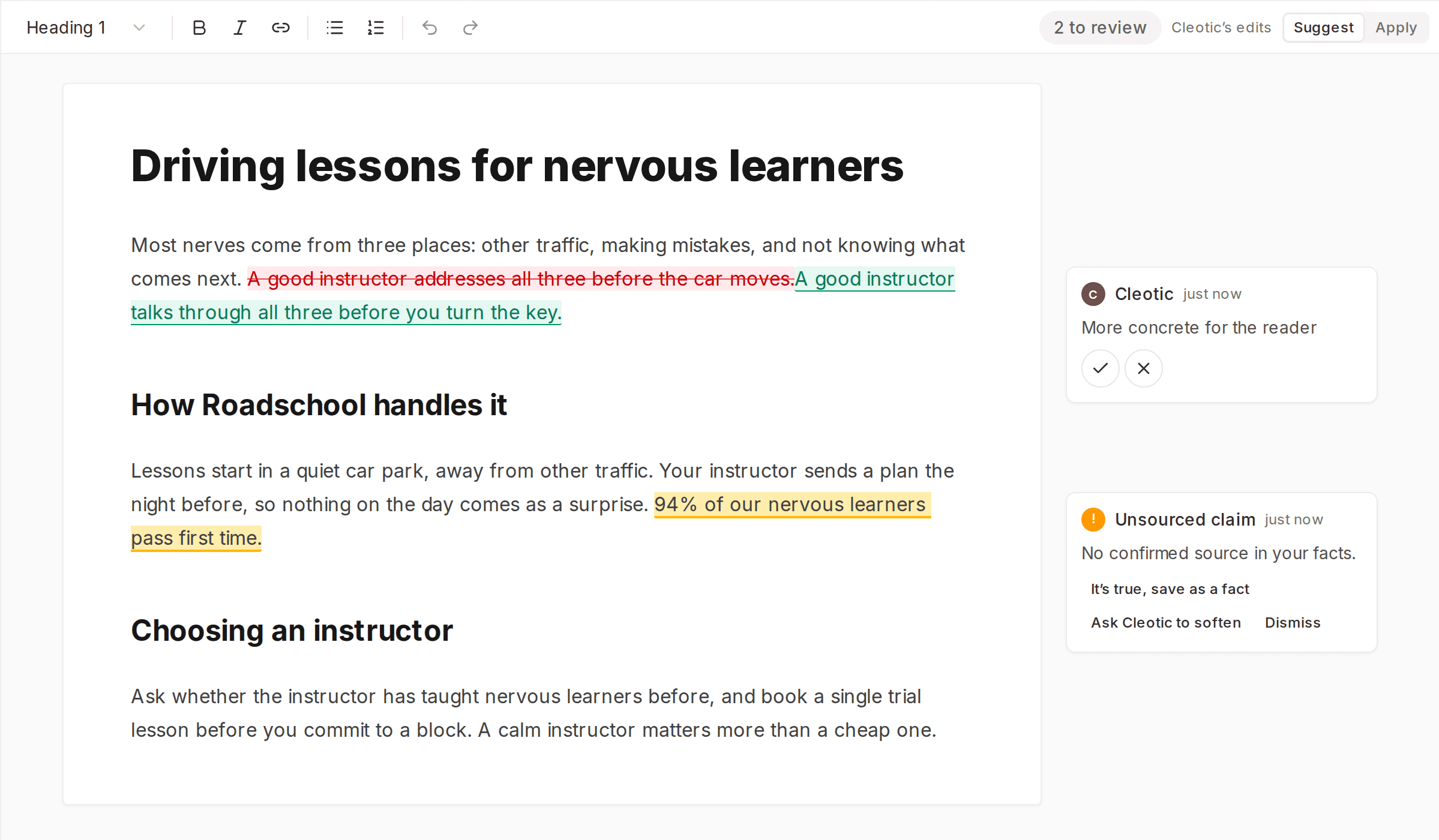
Select any text to Ask Cleotic about it, or to Shorten, Make clearer or Find a source.
When the page is ready, Publish sends it to your CMS as a draft, or marks it as published at its live address. Once it's live, the Publishing tab compares how often answers named and cited you in the four weeks before it went live with the time since. History keeps every version, and you can restore any of them.
One page for each prompt
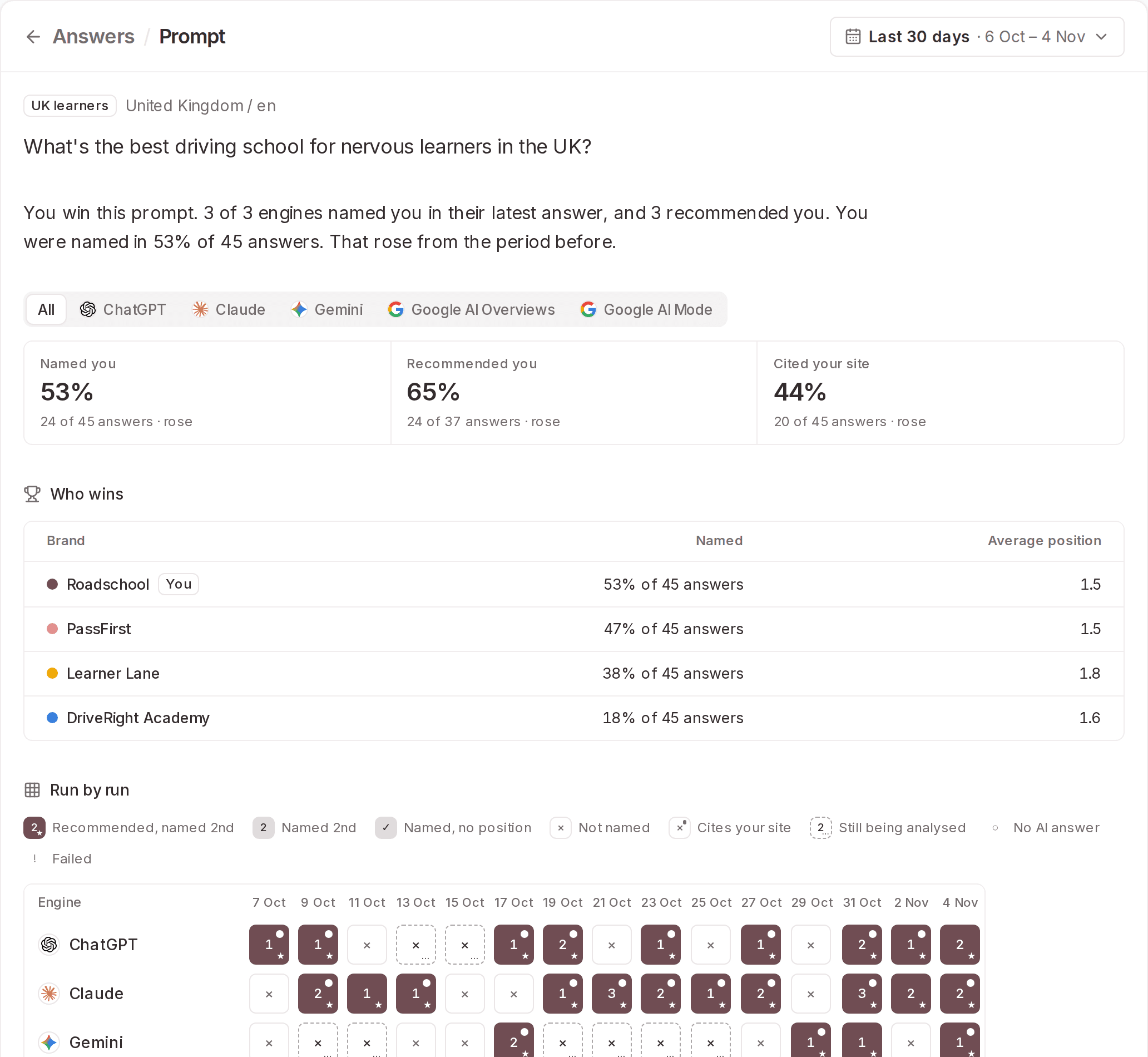
A prompt's page now opens with a verdict, such as "Acme wins this prompt". It then says how many engines named and recommended you in their latest answers. Below the verdict:
Named you, Recommended you and Cited your site show your results across All engines, or for one engine at a time.
Who wins ranks the brands the answers name.
Run by run shows each engine's result on each run: your position, whether it recommended or cited you, and any run that failed.
These replace the chart and tables that were there before.
Each answer now has its own page and its own link. Above each answer, a line says what the engine did, such as "Searched 2 times. Read 7 pages . Cited 5 sources".
See which visits really come from people
AI traffic used to count any request it didn't recognise as a person. Uptime monitors, SEO tools, link previews and scrapers posing as browsers all added to your visits.
Cleotic now stores every request your site reports and gives each one a class, such as AI agent, search engine, SEO tool, monitor, person, or person from an AI assistant. A browser request counts as a person unless something points to a bot. Requests that claim to be a known crawler are checked against the IP addresses its operator publishes, now including Google's, Bing's and Apple's, and fakes are marked as spoofed.
Because of this, your visits and AI share may fall. Your earlier history was copied across and classified the same way.
The AI traffic Overview now follows the path from crawl to visit, in four stages:
Read for training
Indexed for AI search
Fetched to answer a question
Clicked through to your site
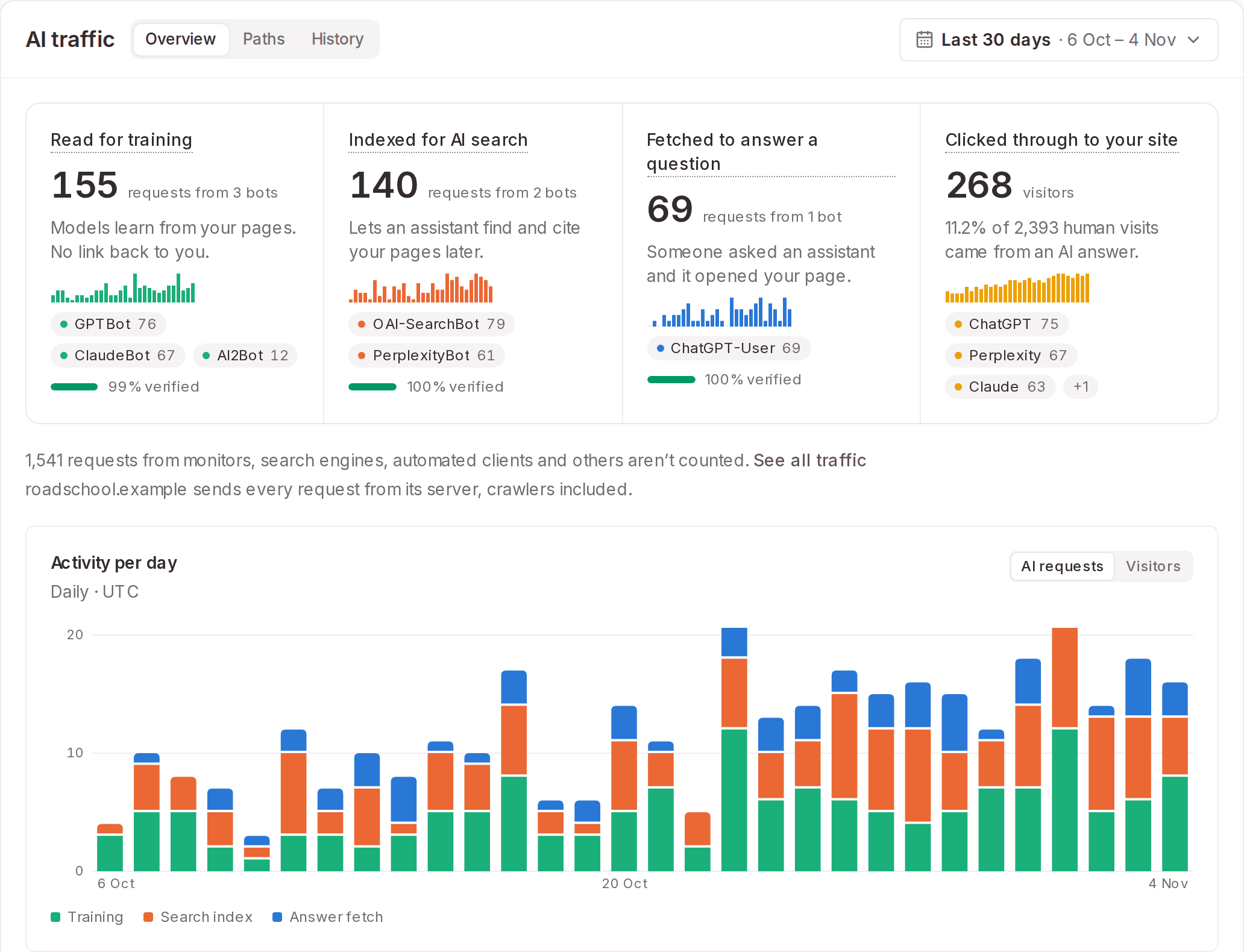
Below the stages, By AI company shows how many of each company's requests were verified, and Pages AI reads most lists the pages AI requests most, with their visitors. Search engines such as Googlebot are listed but not counted, because the same request also serves ordinary search.
To look through every request, open History and choose All traffic, then filter by Class or Host. Each request shows the evidence for its class.
Some URLs that look like pages aren't, such as an image route like /og/my-post. In Brand settings › AI traffic, owners and admins can add brand rules. A brand rule hides matching requests for everyone, or sets their type, such as preview image or asset. Rules also apply to past traffic. Anyone can add personal exclusions, which change only their own view.
Tracking also keeps less. A visitor's IP address is turned into a country, a network and a visitor ID that changes daily, then discarded. Only requests that claim to be a known crawler keep their IP, for 90 days, so the claim can be checked. Email addresses and tokens in URLs are redacted.
If a newly connected site hasn't sent any data within a day, the workspace owner gets an email. If a WordPress site sends no visitor IP addresses, Overview says so and gives the likely reason, because without them Cleotic can't check which crawlers are real.
Readiness checks that follow published guidance
In October we published a technical SEO guide for people with no technical background. Writing it meant checking what Google, Bing and others document. We then checked the site readiness rubric against the same sources and changed the checks that disagreed.
Blocked crawlers hold your score down: If robots.txt blocks Googlebot or keeps returning a server error, or your homepage is set to noindex, Site readiness and SEO health can't go above 39. Blocking Bingbot holds both at 59. Blocking OpenAI's, Anthropic's and Perplexity's search crawlers all at once holds Site readiness at 59. Before, a site in this position could still score Good.
Text in the HTML: This new check flags pages whose HTML has almost no text because JavaScript adds it later. Most AI crawlers don't run JavaScript, so they see a blank page.
Buttons and forms an assistant can use: This new check lists form fields with no label, and buttons and links with no name. Assistants that act for a customer find controls by their names. For now the check is for information only and doesn't change your score.
Structured data: Any schema.org Organization type with a name now passes, including specific types such as
OnlineStore. Marking up ratings of your own business warns, because Google doesn't show stars for them. Cleotic no longer writes or recommends FAQPage markup.Sitemaps and links: Pages set to noindex, or canonicalised to another page, no longer count as missing from your sitemap. Internal linking now looks for dead ends and pages nothing links to.
Freshness and size: Freshness accepts any page with a usable date and notes when the date is old, because changing dates without changing content can backfire. Page size warns above 1 MB and fails above 2 MB, which is what Googlebot reads. A missing llms.txt is now a note.
Scans now identify themselves as CleoticBot and follow your robots.txt, including any crawl delay. They no longer fetch pages under other companies' crawler names. If your robots.txt blocks CleoticBot, the scan stops and says so.
The separate Security score has gone, and HTTPS is now a check under Access. Each check's Why it matters now says whether its reason comes from documentation, research or our own reasoning, and links the source. Every check is described in Readiness checks.
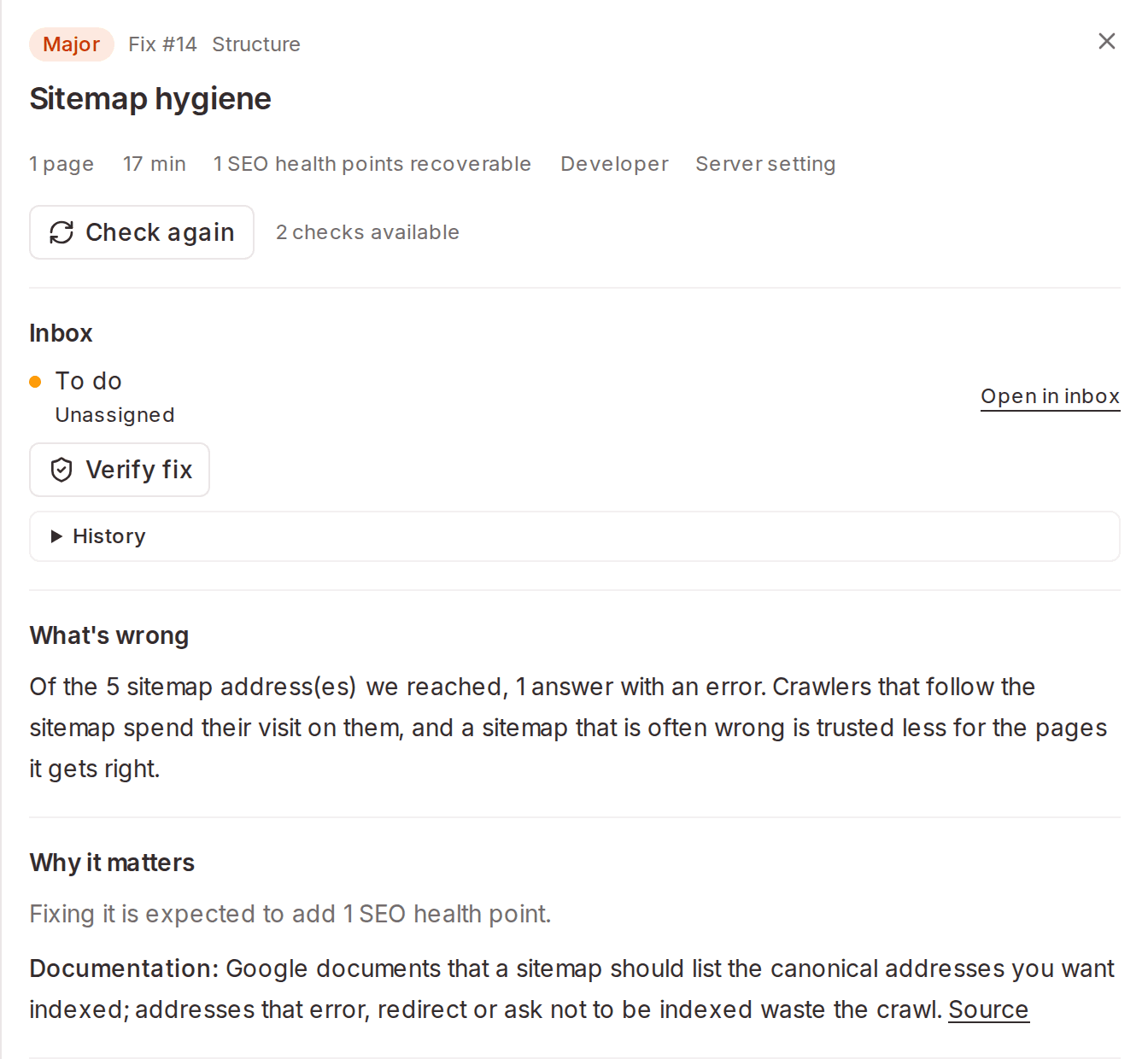
A scan that can't read your site now fails straight away and tells you why, instead of retrying for half an hour.
Your score may move on your next scan. History labels these moves as scoring changes, so you can tell them apart from changes to your site.
Engines, collection and plans
Cleotic stopped monitoring Muse and Perplexity on 5 October. It now monitors ChatGPT, Claude, Gemini, Google AI Overviews and Google AI Mode.
Scheduled prompts now run every day on every plan, instead of on Mondays, Wednesdays and Fridays. Answers shows when the next collection is due.
Our plans changed in October:
Every plan has unlimited brands and unlimited competitors.
Starter covers ChatGPT and Google AI Overviews. Business and above cover all five engines.
The 14-day trial now runs on Starter and doesn't need a card.
Prompt packs add prompts on Starter and Business, and content packs add Content Studio pages on Business.
Content Studio and Reputation are on Business and above. Starter no longer includes Content Studio.
On our pricing page, the Custom plan is now called Enterprise.
Client reports you can edit and send
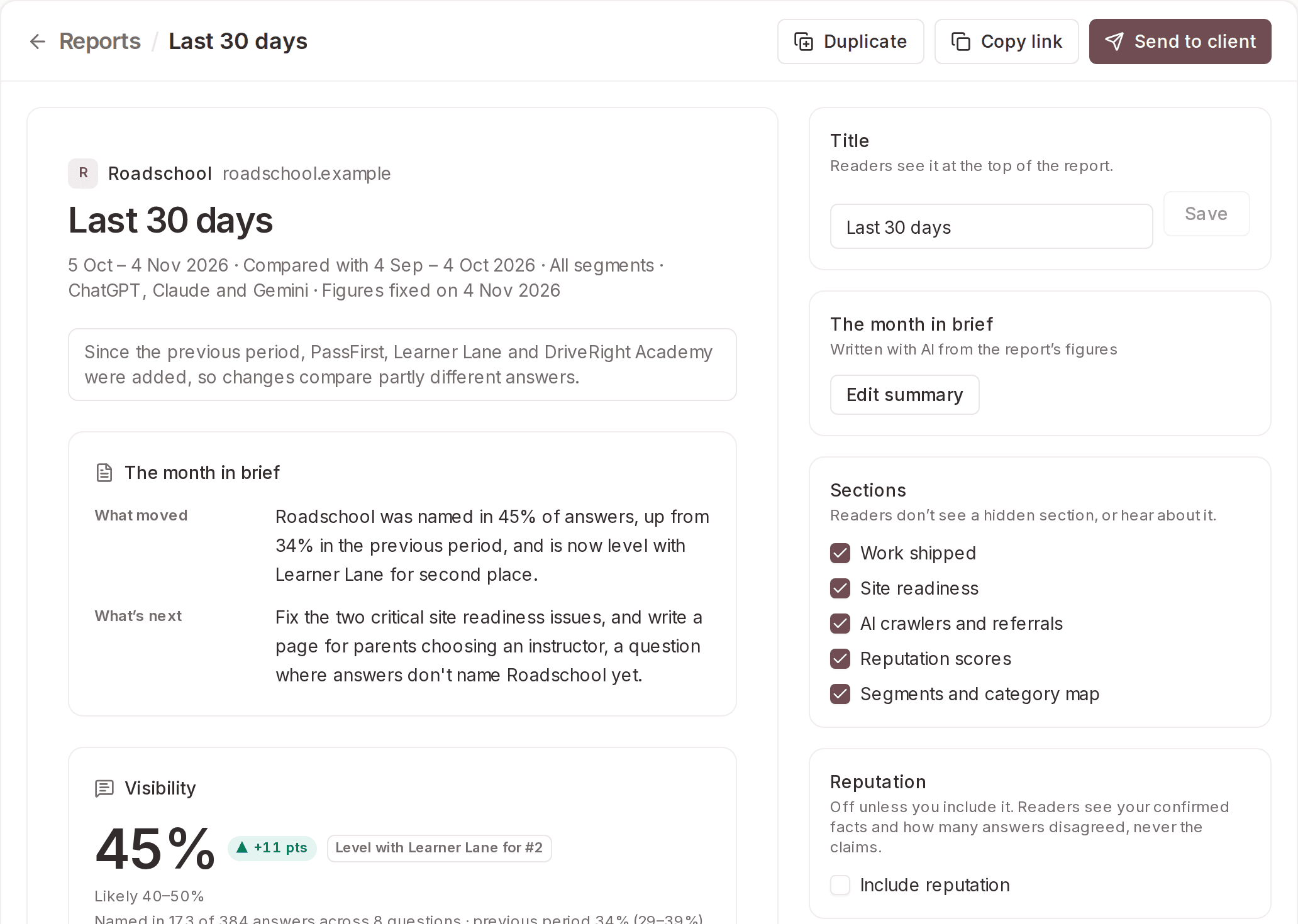
Reports are now one fixed, printable document for a period you choose, such as last month or last quarter. Each is written as a Client report or a Team update, and its figures are fixed when it's created.
Before you share a report, you can:
edit its title and its AI-written summary;
hide optional sections, such as site readiness, AI traffic or Content Studio results;
add next month's plan;
choose up to six answers to quote.
On Business and above, Send to client emails a report's link from your organisation. Set your logo, colours, sender name and reply-to address in Settings › Client reports. On Enterprise, the shared report carries your branding too. Include reputation adds a Reputation section, which leads with your confirmed facts and never quotes a risky claim.
A weekly email that leads with what changed
The weekly email now arrives on Monday at 06:30 UTC. If you have more than one brand, it opens with up to four headlines about what changed. Brands that moved or need a fix get a full card, and the rest get one line each. Like Overview, it only reports a change when it's bigger than normal variation could explain.
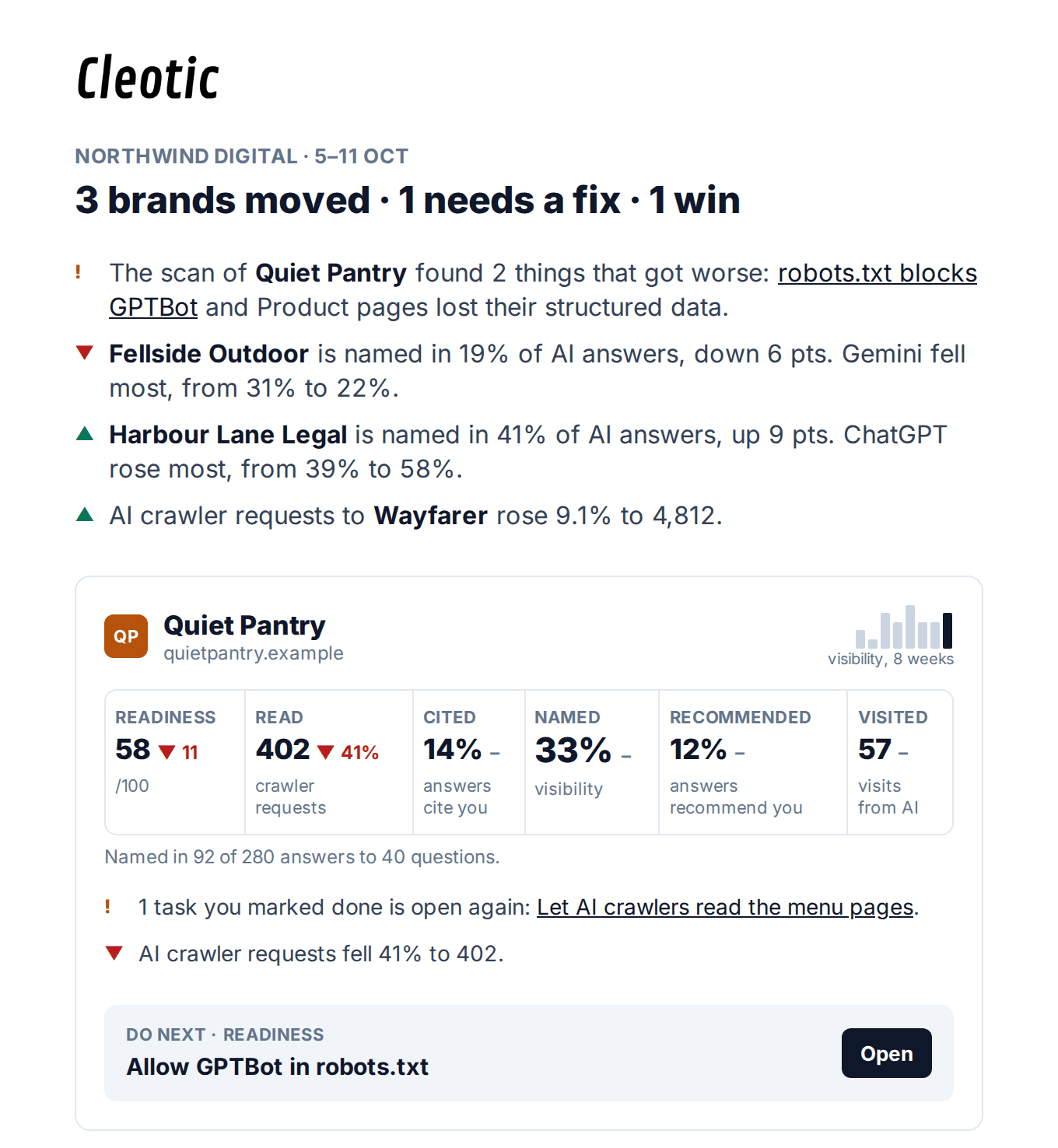
On Business and above, it also shows what AI answers say about any brand with open narratives or alerts that week.
Site readiness results are now part of this email. You'll only get a separate scan email after a brand's first scan, or when a weekly scan finds something that got worse.
Free guides and tools
cleotic.ai/guides has two free guides for marketers, founders and small-business owners:
Technical SEO: How Google, Bing and AI assistants find and read your pages, and what to check, fix or ignore.
AEO and GEO: How ChatGPT, Google's AI Mode, Perplexity, Claude and Copilot decide what to say about a business, and what you can do about it.
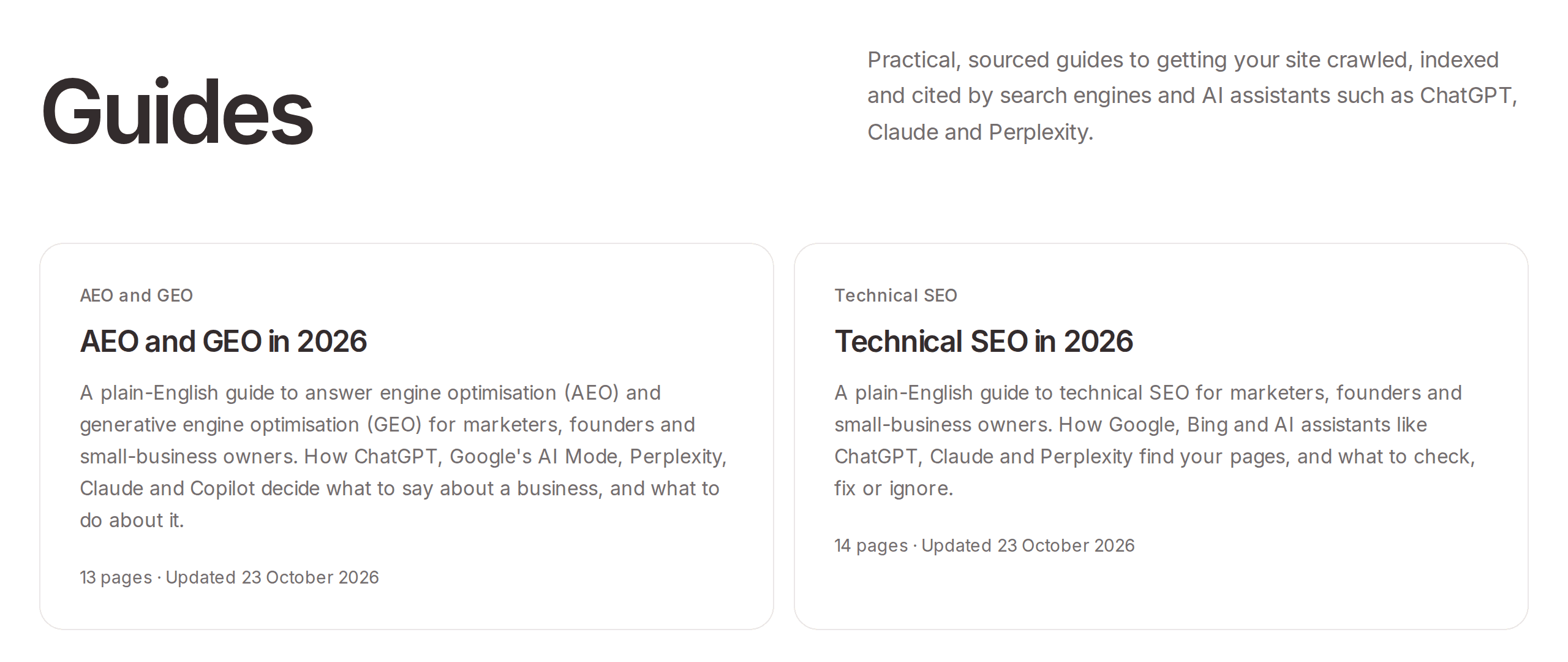
Each chapter opens with a short summary of its main points. The free AI Readiness Checker and AI Visibility Checker have moved to cleotic.ai/tools, next to the guides. Old links redirect.
More of Cleotic from the CLI
Version 0.6.0 of the CLI adds commands for scripts and CI pipelines. Run cleotic update to get it.
cleotic setup <url>: Reads a website and proposes the brand, competitors, market, segment and prompts, the same way the app does.cleotic readiness show: Prints the latest score and open issues.--fail-under 70exits with code 3 if the score is below 70, so a CI job can fail when your score drops.cleotic opportunities: Lists opportunities and moves them between stages.cleotic ai-traffic: Exports a brand's AI traffic for a date range.cleotic reports: Lists, reads and creates client reports.
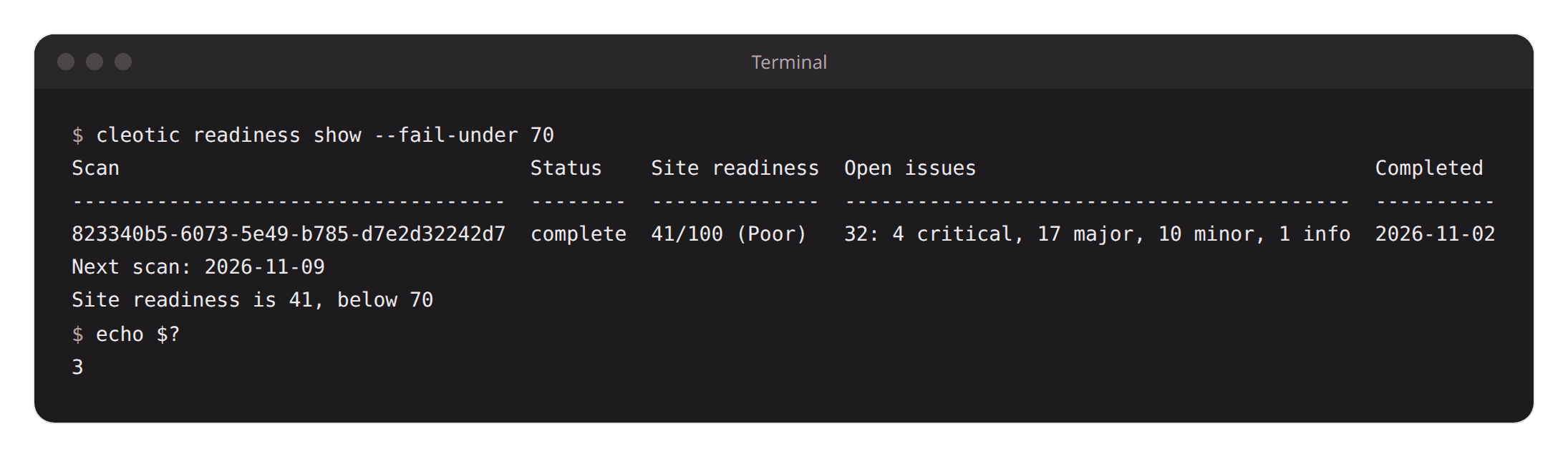
cleotic monitors is now cleotic segments, and the old name still works. cleotic setup now needs a browser sign-in. Scripts that use an API key can still build a brand with projects create, primary-brand set and segments create.
Smaller changes
Connected agents (MCP): New
get_reputationandget_narrativetools, on Business and above. Content Studio has tools for working on pages with Cleotic, such asmessage_page,edit_pageandsend_page_to_cms, and for facts,search_factsandsave_fact.get_ai_trafficnow lists search engines. AI agents and MCP directories can find Cleotic's server through its AI catalog atcleotic.ai/.well-known/ai-catalog.json.Segment audiences: Covered in their own post.
API keys: A CLI API key made from 1 November stops working when the person who made it leaves your organisation. The keys list shows who made each key.
Team access: Removing someone from your organisation ends their access on their next request, and they stop getting the weekly email.
Workspaces after a plan ends: A workspace is deleted 60 days after its trial or subscription ends. The owner gets an email when the plan ends and another 7 days before the deletion. Deleting an organisation now cancels its subscription straight away.
Vercel log drains: When you save a new drain secret, the old one keeps working for an hour, so no visits are lost while Vercel switches over.
Tracking reliability: Tracking now saves each visit before confirming it, and returns an error if it can't, so the sender can try again.
Trust and privacy: A Trust center is now linked from the footer, along with our status page.
Consistency: Dates, badges, toggles and empty pages look the same across the app, and each competitor keeps one colour in every chart and report.
Keyboard: Tab now stays inside open dialogs, panels and the ⌘K/Ctrl-K launcher.
Sign out of all sessions: Now tells you if a session couldn't be ended, instead of signing you out anyway.